
Launching a website feels really exciting. Making sure people can find it on Google needs a lot of thought. Even a website that looks great can have trouble if search engines don’t understand what it’s about or if visitors can’t find the information they need.
Learning how to do SEO for new website starts with a strong plan. You need a website that works well the words that people search for content that helps people and a way to see how well things are going. Whether you are starting a business website, an online shop or a new blog, in the United States these ten steps will help you create a better base for people to find you through search engines.
1. Set Up Your Website
I find that the foundation of your website decides how visitors will interact with your pages and how search engines will discover your content. Before publishing articles pay attention to a domain, reliable hosting, a suitable design and basic technical settings. A proper SEO setup, for a website will make future optimization easier.
A new website does not need software or complicated features. Instead prioritize speed, security, accessibility and straightforward navigation. These decisions support website SEO optimization. Help prevent avoidable problems as your site grows.
A new website also benefits from ongoing technical monitoring and consistent optimization. Explore this guide to SEO automation and website optimization to learn how automation can help identify repetitive SEO tasks while keeping important decisions under human control.
Get a Domain Name
A good domain name should be easy to remember. It should also be simple to spell. Make sure it connects well with your brand. For people in the US a.com domain often feels natural.. Other domain types can work just as well if they fit your business. Stay away from spellings. Don’t use hyphens unless you really need them—they can make your website address harder to recall.
You don’t have to have a keyword that matches your content exactly to get search engine results. Focus on a name that fits your brand over time. Don’t just go for a SEO boost. Think about how the name will stand for years. Before you register check if the name is already trademarked. Also see if the name is available, on social media sites. This helps keep your brand consistent.
Select a Theme
The website theme affects how your website appears and what it feels like to use. It also influences how easy it is for people to move around the site how well it works on devices and how quickly it opens. It is an idea to select a theme that is not heavy and that shows your content clearly on computers, tablets and phones. Before putting any themes on WordPress look at how good they’re how often they are updated if they are simple to use and if they work with plugins.
Avoid themes that have many animations and code because these can make your pages take longer to load and take the visitor’s focus away from what you want them to see. A simple look, with words, simple menus and clear buttons works better.
Prioritize Security
Security keeps visitors safe. Security builds trust on a website. I recommend installing an SSL certificate so that pages load using HTTPS. I advise keeping a content management system, themes and plugins up to date. I suggest using passwords and enabling two‑factor authentication whenever possible.
Also set up backups and limit administrator access, to only trusted users. Before launching check a robots.txt file and indexing settings carefully. A missed noindex directive can stop search engines from finding pages even if the content’s great.
Optimize for Mobile Screens
Many Americans use their smartphones to browse, research products and compare services. Google also relies on the version of website content when it indexes pages because Google follows mobile‑first indexing. Therefore your mobile pages must include the essential information that appears on the desktop counterparts.
Test navigation, buttons, forms, images and text, on a variety of screen sizes. Make sure visitors can read paragraphs without needing to zoom or tap on controls. Monitor Core Web Vitals, including loading speed, responsiveness, and visual stability, using Google’s official guidance.
2. Conduct Research
Optimization is successful when people first understand the people they want to reach. Research helps people find the needs of those people the words that those people use and the websites that compete for the attention of those people. That knowledge gives people an practical direction for a new website.
Of publishing random articles people should build a focused plan around topics that matter and opportunities that are realistic. Strong research also stops people from targeting keywords that attract visitors who have interest, in the products or services people offer.
Research Your Customers
First define your audience clearly. I think you should think about where your audience lives what your audience likes, the problems your audience faces how money your audience can spend and how much your audience knows about the topic.
For a US business regional differences matter a lot because your audiences expectations and the words your audience uses in searches change from one state to another and from one industry to another.
For example a plumbing company, in Austin must understand the needs of homeowners who are part of your audience. A nationwide software company might focus on business owners who are part of your audience and who are searching for ways to reduce repetitive work. Customer interviews, support questions, online reviews and community discussions can reveal content ideas for your audience.
Research Your Competitors
Competitor research reveals which topics other websites cover and where other websites content falls short. Search Google for the services or subjects you want to target. Look at the pages read their headings check the evidence that supports them see the internal links and note the questions other websites answer.
Look for gaps of copying other websites content. Perhaps other websites explain a process. Give no examples cost comparisons or troubleshooting advice. Fill these gaps with useful information and your pages will become more valuable to readers.
SEO platforms, like Semrush can help examine competing keywords, backlink sources and organic search performance. Treat third‑party traffic and ranking estimates as approximations, not Google data.
Research Keywords
Keyword research for a website helps you figure out what people are looking for and which subjects should come first. Look into topics detailed questions, longer phrases and searches that show someone wants to buy something. Check the purpose, behind the search how many people are looking for it how hard it is to rank for and if you can really help people with the answer.
A new website might find it easier to target searches that don’t have much competition instead of big terms that everyone is trying to rank for.. Even if a search isn’t competitive it doesn’t mean it will get you rankings or traffic. Pick keywords that match what you know. What your business wants to achieve then put similar searches together into logical content areas.
| Keyword type | Example | Likely intent |
|---|---|---|
| Informational | How to improve website SEO | Learn a process |
| Commercial | Best SEO tools for small businesses | Compare options |
| Transactional | Hire an SEO consultant in Chicago | Purchase a service |
| Navigational | Google Search Console login | Find a specific destination |
These examples illustrate common search patterns. Confirm the actual demand and competition using keyword research tools before selecting your primary targets.
3. Structure Your Website
A logical website structure helps visitors find information quickly. They don’t have to click times to get what they need. It also helps search engine crawlers understand how pages are connected. Organize your sections based on what your audience wants. Don’t create categories just to cover every keyword. Focus on user needs.
For example a digital marketing website could have service pages an SEO learning center and supporting articles. Every article must have a purpose. It should link naturally to related content. Make sure important pages are easy to find. Use navigation that makes sense. Add links in context so users and search engines can follow them easily.
Think about your URLs before publishing a lot of content. Use addresses like /technical-seo-guide/ instead of long strings, with extra parameters. Build an XML sitemap with the URLs you want search engines to find. Then submit it through Google Search Console.
A sitemap helps with discovery. That doesn’t mean all pages will be indexed. Important pages must also be linked in ways that search engines can follow. Check for chains. Look for links. Make sure test pages aren’t accidentally indexed. Do this before your site grows too large.
4. Create Search Engine-Optimized Content
Useful content shows search engines a reason to think your pages match specific searches. Good SEO advice for beginners begins with answering questions precisely adding helpful details and making the information simple to find.
Create a content plan that explores your topic in detail. Release guides together with focused articles that solve particular problems.
Content creation can involve research, outlining, optimization, and regular updates. This guide to autoblogging AI, its benefits, and risks explains how automation can support content workflows while maintaining editorial review and content quality.
Every page should add something rather than repeating information that already exists elsewhere, on your website.
Match Search Intent
Keyword search intent shows what a person is actually trying to do when they type something into a search engine. For example if someone looks up “SEO definition ” they want an explanation.. If they search for “SEO agency ” they’re probably looking for service details proof that the agency works and how much it costs.
Look at what’s showing up in Google for your keyword. See what kind of content ranks. Is it step-, by-step guides? Lists? Reviews? If tutorials are common write a hands-on guide of a sales page.. Don’t just copy what’s out there. Make your content better. Explain things clearly. Use examples. Add your thoughts and insights that help the reader. That’s how you stand out.
Target Relevant Keywords
Choose one subject for each page. Include related words in a smooth way. Put the word in the title inside the H1 heading at the start and in sections where it fits. Use words and ideas to describe the subject
Do not force the words into every part of the writing. Using the words often makes writing seem stiff and can cause problems, with Googles guidelines. Instead create groups of articles in topic clusters and link them when it improves the reading experience.
Incorporate E-E-A-T Signals
Google likes content that’s helpful, reliable and people‑first. Google wants you to show that you know what you talk about by giving explanations real examples, your own observations and trustworthy references. Google also wants you to always write your name clearly and say what qualifications you have if that is relevant.
Trust is also important. Trust means making sure the business phone number and address are correct stating what rules you follow for editing and saying if you have any business ties that might influence the article. When you write about health, money or safety trust that you use experts and reliable sources. E‑E‑A‑T is a idea about quality, not a rule that will automatically make your page appear high, in search results.
Read Google’s guidance on helpful, reliable, people-first content for more details.
Structure Your Content Using Headings
Clear headings make it easy for people to look through a page and find the information they need. Use one H1 heading for the main subject. Use H2 headings for the parts of the text. Use H3 headings, for details. Make sure each heading has a purpose. Don’t add words just to make it sound better.
Split up hard to understand parts by adding examples. Use paragraphs. Use tables. Add pictures or diagrams when they help explain something. Good formatting makes it easier to use.. Headings alone can’t fix content that is not good or not correct.
5. Implement On-Page SEO
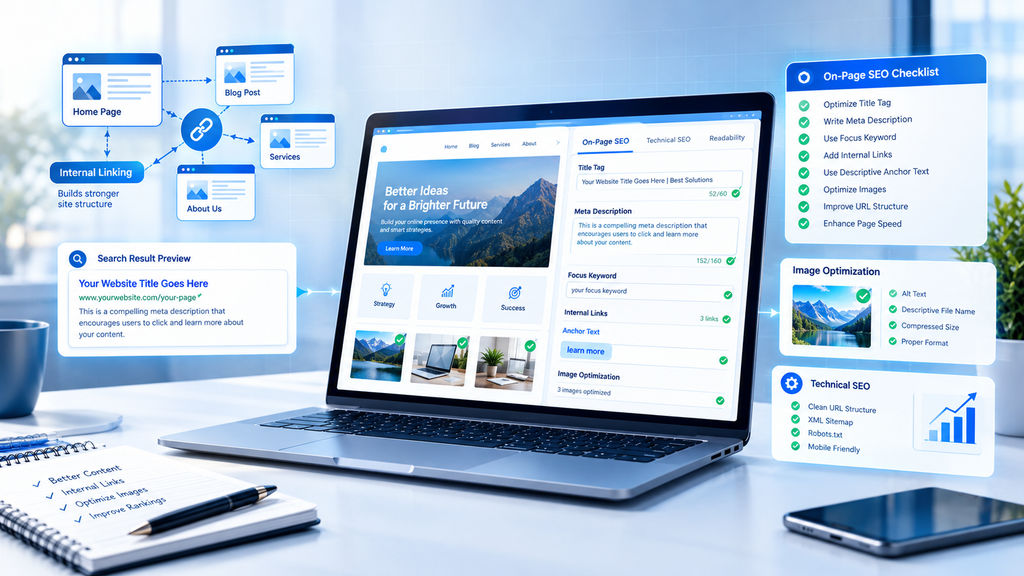
On-page SEO practices of new websites enable search engines to comprehend separate pages and allow users to identify results worth visiting and those that should be avoided. Usually, it refers to titles, description, headers, images, URLs, and internal links that help crawlers establish the connection between related bits of information.
As your website grows, finding optimization opportunities across many pages can become time-consuming. Learn how SEO automation can support internal linking and metadata optimization without removing the need for human review.
Thus, all of the significant elements should be optimized right before publishing each page. It will ensure that the site’s content suits best the search queries and that metadata accurately describes a certain article or blog post. On-page SEO optimization will make the website clear and attractive to the audience without confusing users.
Create a Title Tag
Your Meta title should concisely reflect the contents of that page and entice visitors to come to your site. Feature the main keyword you want to rank for somewhere in the phrase, ideally near the front, but create a title that doesn’t sound like every other website on the planet.
I.e. ‘SEO for a New Website – 10 Essential Steps’. You’ll notice that Google adds its own twist to the title link as well. Save your page from being heavily penalized by Google for keyword stuffing and unsubstantiated claims.
Write a Meta Description
A good Meta description acts like a summary of the page’s primary offer. You should write a brief paragraph mentioning what the page is about and what the reader will find there. It is wise to include a relevant keyword if possible. Although Google reads your meta description and uses it for the search result snippet, it can pull the text out of your web page’s content.
The snippet could be something like that: “Learn how to optimize a new website for Google with practical steps for keyword research, technical SEO, content, and performance tracking.” Notes: write a unique meta description for each of your important pages and do not use the same one for all of your web pages.
Include Internal Links
Internal linking is a way to connect web pages that belong to the same website. By putting links, on a page visitors can read more about subjects and search engines can see how the pages fit together.
Always use linking on articles that are related. For example put a link from a beginner SEO article to a guide or a technical audit page. If a resource is mentioned, give it a backlink. For instance when talking about crawlability and crawler bots link to a SEO guide. Do not add every link just to increase the link count. Every internal link must give value and useful information to the reader.
Use Descriptive Anchor Text
The anchor text is what users see when they hover over the hyperlink, so it is a good idea to make it descriptive. The words technical SEO checklist are much better than something generic like click here . You want the text to be slightly relevant to where the link is going, but don’t go overboard
Don’t stuff exact match anchor text wherever possible. That is spammy and can get your website penalized. Use different variations of the keyword or related terms instead.
Link to Relevant Pages
Place importance on links that allow readers to learn a topic more fully. For example a page about keyword research could point to a guide on search intent and a piece, about website migration could point to a redirect checklist.
Look for internal links and orphan pages that have no useful internal links. Make sure that important content can be reached through navigation or contextual links. This method helps discovery. Creates a clearer browsing experience.
Optimize Images
I have found that images can explain ideas, display items and attract visitors by using image search. Images should have filenames, helpful alternative text and the correct sizes. Images should be compressed and new formats such, as WebP or AVIF should be chosen when the platform allows.
Images must have alt text that tells the purpose of an image or its key content. Images that are purely decorative usually need an alt attribute instead of keyword filled text. Images should not be loaded in size when a smaller version will suffice.
6. Establish Credibility and Earn Backlinks
Links from trustworthy websites can help search engines find your content and understand how important it is. Building a backlink profile takes time especially when your website is new and doesn’t have much original research or brand name recognition.
Create resources that other people will want to link to. Examples include industry surveys, step-by-step tutorials data or useful tools. When reaching out to publishers be clear about why your resource would help their readers. Guest posts can also increase visibility. Only if they add real value and follow the site’s editorial rules.
Don’t buy links that are meant to trick search engines. Avoid automated link-building tools and big link exchanges that only care about passing power. Paid ads and sponsorships are okay for marketing. You must handle paid links correctly. Google outlines these rules in its spam policies.
To check backlink quality look at how relevant the linking site’s how the link fits into the content and how trustworthy the site is. A few quality, naturally earned links might help your audience more, than a big pile of random unrelated links.
7. Distribute Your Content
Publishing an article is the start. Distribution helps your intended audience discover the article while your website grows its search visibility. Share the article through social channels, email newsletters, professional communities and relevant industry publications.
If your website targets the United States choose the channels where your real audience spends time. A B2B software guide can perform well in communities while a local service article can aid your email outreach to partners. Adapt the article’s message, for each channel; do not post promotional copy everywhere.
You can also transform the guide into a newsletter, a handy social post or a clear infographic. These formats let people find the guide again in settings. Pay attention to engagement and referral traffic, rather than hoping that social shares will directly boost rankings.
8. Set Up a Google Business Profile
Local businesses that follow Googles eligibility rules can use a Business Profile to show up in search results and on Google Maps. This is especially helpful for businesses that serve American cities, neighborhoods or defined service areas.
Not every business can qualify. Online- businesses usually don’t meet the requirements, for a Business Profile. Review Google’s Business Profile eligibility and guidelines before creating one.
Choose the Right Category
Choose the category that best describes your business. A suitable category lets Google know what your business does and when a category may matter for searches.
Do not pick categories just to show up for more searches. Add categories only when a category truly describes the services your business offers.
Consider Seasonality
Some businesses have changes in how many customers they get during the year. For example landscaping companies in the United States might have needs from customers in spring and in autumn. Tax help services usually have people needing their help before the dates when taxes need to be filed.
Make sure the service details and the hours of the business are correct during the changes in the seasons. Share updates that help customers get ready. Don’t use seasonal information instead of keeping the real business details up, to date.
Include Relevant Photos
Use genuine photos of your storefront, your team, your products or your finished projects. Good images help people see what they can expect before they reach out.
Make sure your photos are up, to date and truly show your business. Don’t use stock images that don’t match your services or locations. It’s important to show what you actually offer.
Ensure NAP Consistency
NAP stands for your business name, address and phone number. Make sure these details are correct wherever your business is listed online including your website and other directories.
If you run a service-area business follow the address-display rules, from Google. Do not make up a store location. Use a virtual office that is not staffed to give the look of a local business.
Encourage and Respond to Reviews
Ask customers to share honest feedback after an appropriate interaction. Reviews are responded to professionally whether positive or negative and private customer information is kept hidden. Never purchase reviews or offer incentives in exchange, for positive ratings. Reviews influence customer decisions. Help build local prominence yet no single review tactic guarantees better rankings.
9. Set Up Google Search Console and Google Analytics
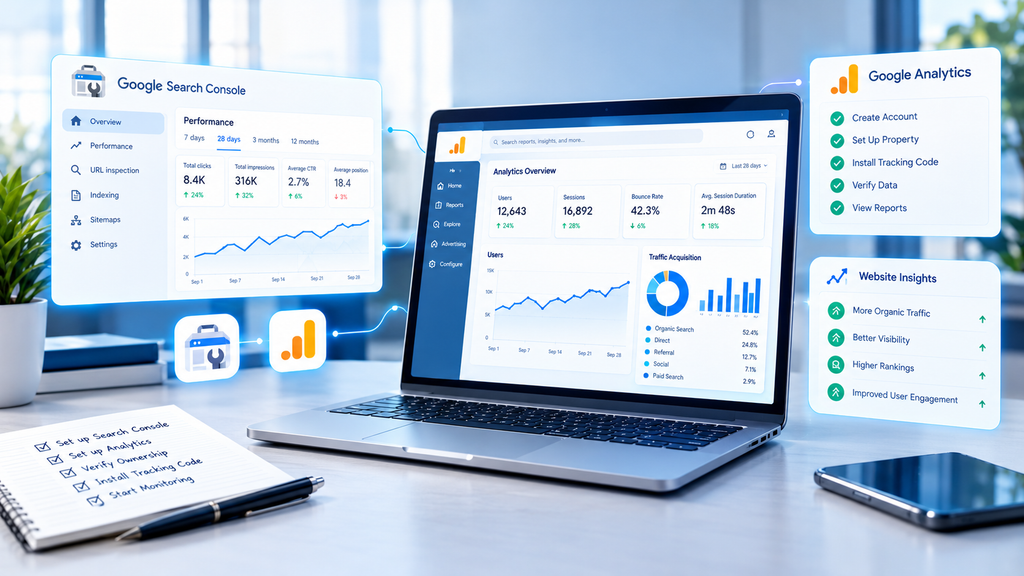
Measurement helps me see the difference between problems and normal changes, in search demand. I set up both tools early so I can create a baseline and watch how visitors find and use my website.
Once your website begins collecting performance data, regular reporting helps you identify changes and prioritize improvements. Read this guide to automated SEO reports to understand how reporting workflows can organize search performance data and reduce repetitive analysis.
These platforms serve purposes. Search Console shows me how my site performs in Google Search while Analytics shows me what visitors do after visitors reach my pages. Together these platforms give me a view of my progress.
Google Search Console
I use Google Search Console to keep track of how my site’s found what people search for how many times my pages appear, how many clicks they get and any technical problems that Google points out. I also check that Google can read my site send my sitemap and look at URLs to see if they are indexed.
I remember that sending a URL does not mean it will appear in search results. If a page still is not indexed I look into tags, robots rules, how easy it is to crawl, duplicate content and overall quality of the page. I use the URL Inspection tool to see what Google says about that page.
Google Analytics
Google Analytics helps you manage and watch website traffic and how users behave on your site. I recommend setting up GA4 to make sure the tracking tag is working properly. You should also test if key events are being recorded correctly.
You might want to keep an eye, on conversion events like completed purchases lead forms that are submitted newsletter sign-ups or contact requests. Just looking at website traffic doesn’t show whether your site is actually achieving its goals. Conversion tracking connects your website performance to business results. It also supports SEO by showing how your site contributes to outcomes.
Integrate GSC and GA in Semrush
SEO platforms can combine several types of performance data in one workflow. If you use Semrush, connect the supported Google accounts and available integrations to review search visibility alongside other website metrics.
Before drawing conclusions, confirm which platform supplies each figure. Search Console clicks, Analytics sessions, and third-party traffic estimates measure different things. Differences between them are normal and don’t automatically indicate a tracking problem.
10. Monitor Results and Adjust SEO Strategy
Consistent measurement helps you identify what deserves attention next. Review performance regularly instead of changing titles, content, and URLs whenever rankings fluctuate. Search demand, competition, seasonality, and Google’s systems can all influence results.
Monitoring becomes more manageable when data collection and routine checks follow a consistent process. Understanding how AI automation works can help you identify opportunities to streamline repetitive tasks while retaining control over your SEO strategy.
Use the data to form specific hypotheses. If a page receives impressions but few clicks, review its title, snippet, intent match, and competing results. If it attracts visitors but few conversions, examine content relevance, page usability, and the clarity of your next step.
Check Impressions
Impressions show how often your website’s results appeared in Google Search under the reporting conditions. Growing impressions can indicate that more queries are triggering your pages, although impressions alone don’t prove that rankings or business results have improved.
Use Search Console to compare pages, queries, countries, and date ranges. For a US-focused website, filter by the United States to distinguish domestic performance from traffic elsewhere. Look for meaningful trends rather than reacting to one unusual day.
Analyze Clicks
Clicks show how often people selected your search results. Compare click trends with impressions to understand whether your pages are attracting more visits as visibility changes.
If impressions increase but clicks remain flat, investigate query relevance and search-result presentation. If clicks fall sharply, check whether specific pages lost visibility, search demand changed, or technical problems appeared. Diagnose the cause before making major changes.
Track CTRs
Click-through rate, or CTR, is the proportion of impressions that result in clicks. Calculate it by dividing clicks by impressions and multiplying by 100. For example, 40 clicks from 2,000 impressions produce a 2% CTR.
Interpret CTR in context because search position, query type, device, and SERP features affect user behavior. Compare similar queries and pages over time. Improve titles and descriptions where they accurately communicate value, but don’t assume a higher CTR alone guarantees improved rankings.
Get Started With SEO for Your New Website
The most effective approach combines a sound technical foundation, thoughtful research, helpful content, and steady measurement. Start with the pages that matter most, then improve your website as you learn more about your audience and its search behavior.
A practical New website SEO checklist should include verified indexing settings, a submitted sitemap, mobile-friendly pages, useful metadata, relevant internal links, and reliable analytics. Build on these fundamentals before investing heavily in advanced tools or large-scale publishing.
For your first three months, focus on completing the setup, publishing a focused group of high-quality pages, and reviewing performance data regularly. Your results will depend on the market, competition, website quality, and how well your content meets searchers’ needs.
Your Competitors Are Ranking for Your Keywords Right Now.
Your competitors may already have established authority, useful backlinks, and content that satisfies searchers. That doesn’t mean a new website has no opportunity. It means you need to identify specific gaps and give visitors a compelling reason to choose your pages.
Start by comparing the top results for your priority queries. Find unanswered questions, weak explanations, missing examples, and outdated information. Then create genuinely better resources and connect them through a logical internal linking structure.
Remember that how to rank a new website on Google has no guaranteed shortcut. Consistent improvements, accurate information, useful content, and a clear understanding of your audience provide a more sustainable path than chasing quick ranking tricks.
Treat SEO as an ongoing process rather than a one-time launch task. As your website earns visibility and you learn from real performance data, refine your strategy around the pages and topics that create the greatest value for your readers and business.