

AI image generation can take an idea and turn it into a clean finished picture.. The quality of the result depends a lot on how clearly you explain what you want. A good Gemini AI Photo Prompt gives Gemini directions about what the image should show—like the subject how it’s arranged, the mood, the light and the visual style. Without these details the result can be unpredictable.
Google’s current advice says to start image requests with words, like “draw,” “generate,” or “create.” After that describe the style the subject what’s happening and the setting. Google also points out that using subject, composition, action, location, style and editing instructions helps build prompts. These elements make the image come out better and more as expected.
What Is a Gemini AI Photo Prompt?
A Gemini AI Photo Prompt is a written instruction that tells Gemini what type of image you want to make or change. It can be a request for a realistic picture or a full explanation that includes the person or thing in the image the way the camera is pointed the place behind the subject the colors, the light, the clothes, the feeling and the style of the final picture.
For example of just asking Gemini to make “a business photo ” you can say a young business person in a new office say there is light from a window ask for real looking photos and talk about a small focus, on the main thing. This helps the AI understand better what you want to see.
Why Your Prompt Matters
A vague request can produce an image that looks attractive but does not match the user’s idea. The subject may be wrong. The background may feel generic. The composition may not suit the user’s intended use.. The image may have a different mood than the user expected.
A well‑written Gemini AI Photo Prompt reduces that uncertainty.
The difference becomes particularly important when the user is creating images, for blog posts, social media, marketing campaigns, presentations, product concepts, profile pictures or other projects where the visual needs to communicate an idea.
The Six Core Elements of a Strong Prompt
The most reliable approach is to think about your prompt as a visual brief. Start with the subject, then explain how you want it presented.
Subject
Tell Gemini exactly what should appear in the image. Instead of saying “a woman,” you might describe “a confident young professional wearing a tailored beige blazer.” Specific details help establish the visual identity of the main subject.
Composition
Explain how the image should be framed. You may ask for a close‑up portrait, a full‑body shot a movie‑style view, an overhead view, a centered composition or another framing style.
If the image is, for a blog header you may also ask for space on one side so that the headline can be placed there.
Action
Describe what the subject is doing. A person “standing in an office” is different from a person “reviewing a presentation beside a large window.” Action gives the scene a stronger sense of purpose.
Location
Describe the environment. This could be a luxury apartment, urban street, modern office, beach at sunset, futuristic laboratory, or quiet coffee shop. Environmental details make the image more specific.
Style
Choose a visual direction such as photorealistic photography, editorial fashion photography, cinematic realism, watercolor, 3D illustration, or minimalist graphic design.
Google recommends clearly describing the style you want when generating images.
Lighting and Mood
Lighting has the power to completely transform the outcome. Think about daylight, the soft light, during golden hour gentle studio lighting, strong shadows that create a mood, bright neon lights or a cloudy and quiet sky.
You can also describe the feeling as full of energy, peaceful, full of secrets, cozy or formal.
For more advanced examples, you can also explore this detailed guide to Gemini image prompts, which covers photorealistic photo styles, editing instructions, camera settings, and aspect ratios. It is useful when you want to move beyond basic descriptions and create more specific visual results.
A Simple Formula You Can Reuse
A useful Gemini AI Photo Prompt formula is:
Create + subject + composition + action + location + style + lighting + important details.
For example:
“Create a photorealistic editorial portrait of a young entrepreneur in a modern New York office, seated at a glass desk while reviewing a laptop, medium shot, natural morning light, sophisticated neutral color palette, realistic skin texture, premium business magazine style.”
10 Ready-to-Use Prompt Ideas

A good Gemini AI Photo Prompt should match the purpose of the image. You can adapt these examples by changing the subject, setting, clothing, colors, and style.
Professional Profile Photo
“Create a photorealistic professional headshot of a confident young business professional wearing a navy blazer and white shirt, clean modern office background, soft natural window lighting, subtle depth of field, realistic skin texture, polished LinkedIn profile photography.”
Travel Photography
“Generate a cinematic travel photograph of a solo traveler standing on a dramatic coastal cliff at sunrise, ocean waves below, soft golden light, natural clothing movement, realistic landscape photography, wide composition, detailed clouds and atmospheric depth.”
Fashion Editorial
“Create a high-end editorial fashion photograph of a stylish woman wearing a modern autumn outfit on a city street, confident pose, architectural background, soft evening light, luxury magazine aesthetic, realistic fabric texture, sophisticated composition.”
Product Photography
“Generate a premium studio product photograph of a sleek wireless headphone set on a clean stone surface, soft directional lighting, subtle shadows, dark neutral background, crisp details, realistic materials, luxury technology advertising style.”
Food Photography
“Create a photorealistic restaurant-style photograph of a freshly prepared pasta dish on a ceramic plate, warm natural window light, wooden table, subtle steam, shallow depth of field, detailed food texture, elegant editorial food photography.”
Technology Concept
“Generate a futuristic AI workspace with a transparent holographic interface, modern desk, subtle blue ambient lighting, realistic technology details, cinematic composition, premium technology magazine style, clean environment.”
Lifestyle Portrait
“Create a natural lifestyle portrait of a young woman reading a book beside a large apartment window, warm afternoon sunlight, comfortable neutral clothing, realistic photography, soft shadows, peaceful and authentic mood.”
Fantasy Scene
“Generate a cinematic fantasy landscape showing an ancient city surrounded by misty mountains, glowing lanterns along stone streets, dramatic clouds, realistic environmental details, epic scale, atmospheric lighting, high-detail concept art.”
Minimalist Poster
“Create a minimalist modern poster featuring a single green plant in a white ceramic pot against a warm beige background, soft studio lighting, clean negative space, elegant editorial design, balanced composition.”
Reference Image Edit
If you are editing an existing image, describe what should change and what should remain consistent:
“Edit this portrait by changing the background to a modern luxury office while keeping the person’s facial features, hairstyle, clothing, pose, and natural appearance consistent. Use soft window light and realistic photography.”
Google’s guidance also notes that Gemini supports image editing and conversational refinement, allowing users to describe targeted changes to existing images.
Prompt Comparison Table
| Goal | Weak Prompt | Better Direction |
|---|---|---|
| Portrait | “Make a business photo” | Specify person, clothing, framing, setting, lighting, and realism |
| Product | “Create headphones” | Describe product angle, surface, shadows, background, and advertising style |
| Travel | “Beautiful beach” | Add location type, time of day, composition, atmosphere, and camera perspective |
| Fashion | “Fashion photo” | Define outfit, pose, environment, lighting, and editorial style |
| Blog image | “AI image” | Describe the concept, subject, composition, brand mood, and text-safe space |
How to Improve a Weak Prompt
If the first picture is almost good but not quite right don’t start over away. Find out what is wrong. Give Gemini a specific fix.
For example if the main thing in the picture looks good but the area around it is too full tell it to make the area around it simpler while leaving the thing the same. If the light is too strong ask for light that looks natural. If the picture is too tight. Shows too little ask for a bigger picture that shows more of the place around it.
This way of working makes your Gemini AI Photo Prompt better because you are using the picture as a beginning instead of waiting for everything to be perfect, in one try.
Common Prompt Mistakes to Avoid
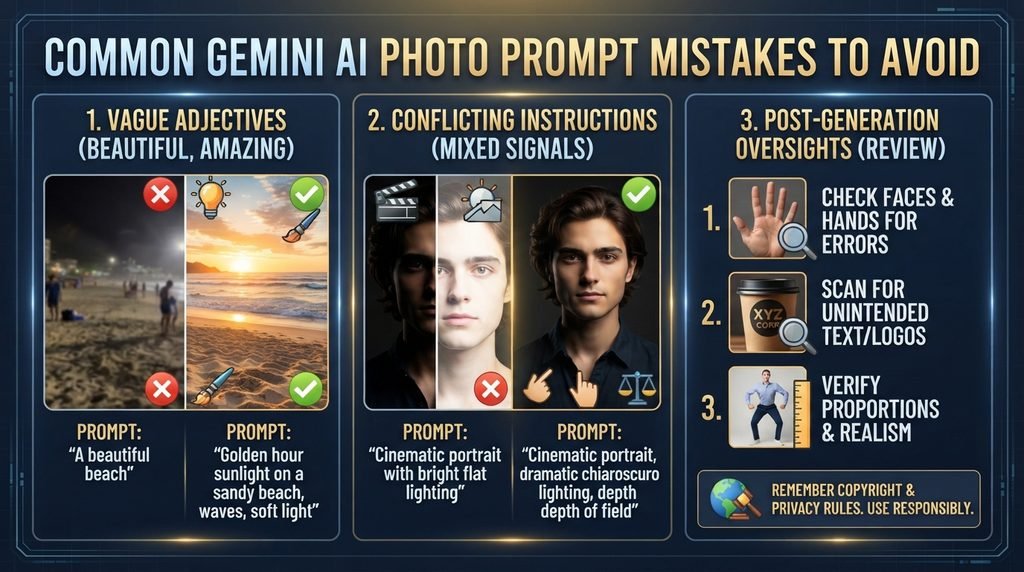
One common mistake when writing a Gemini AI Photo Prompt is using adjectives without explaining what they mean visually. Words like “beautiful,” “cool,” or “amazing” don’t give the AI a picture. Of saying “beautiful ” describe the light the colors, the textures or the kind of mood you want. For example “golden hour sunlight on a beach” is much more helpful, than “beautiful beach scene.”
Another mistake is adding many conflicting instructions. If you ask for a cinematic image but also want bright flat lighting that creates confusion.. Asking for minimalist styling while also requesting an extremely busy background sends mixed signals. The AI gets confused. The result may not match your vision. Keep your directions clear and consistent.
Before publishing any AI-generated image take time to review it carefully. Look closely at faces and hands—these often have errors. Check for any text, logos or product details that might be wrong or unintended. Make sure proportions are correct. Also remember that Google recommends users think about its terms and rules when using generated images. This includes copyright issues and privacy concerns. Always make sure you’re using the images responsibly.
How to Create Better Results With Iteration
Think of prompting like talking with someone. Begin with the idea look at what comes back and then make a small change or two.
You could tell Gemini to shift the camera position swap the background fix the lights make the clothes look more real or keep the person the same but change something in the picture.
This way is often easier, than trying to explain everything in your message.
Gemini vs ChatGPT for Creative AI Work
Gemini is not the artificial intelligence assistant that can support with creative activities. ChatGPT can also be helpful when it comes to creating ideas improving questions coming up with concepts and following through with specific directions.
If you are looking at both systems check our article about Claude AI vs ChatGPT: Which One Is Right, for You?
Final Thoughts
The best Gemini AI Photo Prompt is not always the one. It is the one that clearly shows the picture you want to create.
Begin with the thing you want in the picture explain how it is arranged and what is happening then say where it is, what style it has how it is lit and any important details.
If the first picture is not exactly right change one part at a time. A useful Gemini AI Photo Prompt can therefore be seen as a starting idea of a final instruction.
With a plan and some trying out you can make more regular pictures, for blogs, social media, advertising, shows, product ideas and personal work.
FAQs
Can Gemini create photos from text prompts?
Yes. Gemini Apps support image generation from prompts, and Google provides guidance for describing the subject, style, action, and setting to get better results.
How detailed should a photo prompt be?
A useful Gemini AI Photo Prompt should be detailed enough to communicate the important visual requirements without adding unnecessary or conflicting instructions. Start with the core subject and add composition, setting, style, lighting, and key details.
Can I edit an existing image with Gemini?
Yes. Gemini supports image editing, allowing users to describe changes they want to make to an existing image. Availability and features can vary by account, age, country, and product version.
Can Gemini keep a character consistent?
Gemini’s image generation capabilities include character consistency, helping preserve the appearance of a person or character across generations and edits.
What should I include in a professional photo prompt?
Describe the person, clothing, pose, camera framing, background, lighting, mood, and photography style. Adding details such as realistic skin texture and a clean background can also help communicate the desired result.
Can I use AI-generated images on my website?
You should review the terms and rights that apply to the tool and the content you generate. Also check the image for accidental trademarks, recognizable people, copyrighted elements, or other material that could create legal or ethical issues before publishing it.