

A website can look great on the outside. Still make visitors feel lost or frustrated. This happens when navigation is hard to follow pages load slowly or forms are unnecessarily complicated. These kinds of usability issues can cause people to leave your site without doing what you want them to do. They may never buy, sign up or get the information they came for. A UX audit is a way to find these problems before they cost you business.
A UX audit is a review of your website or digital product. It looks at how easy it’s to use how people actually behave, whether it’s accessible to everyone and how smooth the whole user experience feels. Of guessing what’s wrong a UX audit uses real data. It brings together website analytics, user feedback, testing with people and design best practices to spot the weaknesses.
If you run a store a service website or a platform where people book things, understanding how to do a UX audit is important. It helps you make choices about design. You can improve your site based on facts, not opinions. That leads to an experience, for your users, which in turn leads to more trust, more visits and more conversions.
This guide will walk you through seven steps to do a UX audit. You’ll also find tools that help you do the job faster and better. There’s a checklist you can use to spot problems decide which ones matter most and plan fixes.. You’ll learn how to track progress over time to see if your changes are making a difference.
What Is a UX Audit?
A user experience audit looks at how a website helps visitors reach what they want to do. Those things they want to do could be looking for information checking out products scheduling a meeting making a buy or getting in touch with a company.
When you do an audit you look at the websites layout how easy it is to navigate the content, the forms, the mobile view how accessible it’s how fast it works. You also look at how people act on the site to see where they have trouble or stop doing things.
For instance a beauty salon might get a lot of visitors to their website. Not many people book appointments. A UX audit might show that the button to book is hard to find the details about services are not clear or the form to book needs much information.
The audit helps find the reasons behind these issues and suggests changes that can be tried out.
It is important to know that a user experience audit does not fix problems on its own or promise results. The real value is, in taking the information gathered and turning it into steps that can be taken. Then after those steps are put in place you check if they work.
For the search optimization side of website improvements, read our guide to SEO automation, which explains how technology can help monitor technical issues and manage repetitive SEO tasks.
1. Define Clear Goals for Your UX Audit
Every successful UX audit starts with a goal. If you don’t have one you could waste a lot of time looking at design choices and miss the bigger issues that stop users from doing important things.
First figure out what the website is supposed to do and what problems users might have that get in the way of those goals.
Identify Your Main Objectives
Your goals will depend on the type of website you manage.
- Business websites: Increase qualified inquiries, phone calls, or contact form submissions.
- eCommerce websites: Reduce checkout abandonment and help customers find relevant products.
- Service websites: Make service information, pricing, and appointment booking easier to understand.
- Content websites: Improve navigation, readability, and access to relevant information.
- SaaS products: Help users complete onboarding and understand important features.
Next, translate each objective into a measurable metric. For example, if your goal is to improve appointment bookings, track booking completion rates, form abandonment, and clicks on the primary booking button.
Establish a Baseline
Record your performance before making any changes. Look at things like conversion rate how often users finish a task, how many form errors happen how engaged they’re how long it takes them to complete key tasks.
Use analytics to spot where problems might be. Don’t jump to conclusions based on just one number. For example a high exit rate doesn’t mean there’s a usability issue. Maybe users found what they needed and left.
Write down what your audit will cover, who your target audience is, the main paths users take and what success looks like.
Tip: Start with three to five important user tasks instead of trying to check every page at once. That way the work is easier to handle. Your results stay focused, on real improvements.
2. Collect Analytics and User Feedback
The next step is to understand how visitors interact with your website. A strong UX audit combines quantitative data, which shows patterns, with qualitative evidence, which helps explain those patterns.
Review Your Website Data
Use tools like Google Analytics to look at where your website traffic comes from which pages people land on how engaged they are and whether they complete actions. Pay attention to pages where users often leave before finishing something
For instance if a lot of people visit a service page but only a few make it to the booking confirmation page go through the booking process step, by step. Try to see where things might be going wrong and what changes are needed.
You can also use Microsoft Clarity to watch session recordings and check heatmaps long as you follow the tool’s current features and your privacy rules. These features can show how much people scroll, where they click repeatedly and where they might have trouble interacting with the site.
Ask Users About Their Experience
Analytics cannot explain every problem. Direct feedback can reveal labels missing information and unmet expectations. I have seen that analytics alone does not solve every problem.
Consider collecting feedback through:
- Short website surveys.
- Customer support conversations.
- Post-purchase or post-booking questions.
- Interviews with representative users.
- Moderated usability tests.
Ask questions such, as, “Was anything difficult to find?” or “What if anything prevented you from completing this task?”
I advise you to avoid leading questions that encourage users to confirm your assumptions.
Combine Different Sources of Evidence
Suppose analytics shows that visitors abandon a contact form. Session recordings show users keep clicking on a required field. Customer feedback says the instructions aren’t clear. All of these things together make a case to look into that field.
There’s no number of sessions or survey answers that will always give you solid results. Pick a sample size that matches your website traffic the way you’re doing research what resources you. How complicated the user journey is.
3. Evaluate Usability With a Heuristic Audit
A usability audit using an approach checks an interface based on known rules for good usability. It allows you to find issues in the design even if you don’t have information from users.
A popular method is the Nielsen Norman Group’s 10 Usability Heuristics. These rules offer advice, for looking at how people work with digital products.
What Should You Check?
| Usability principle | What to evaluate |
|---|---|
| Visibility of system status | Do users receive clear feedback after clicking, submitting, or loading? |
| Match with the real world | Does the website use familiar language and understandable labels? |
| User control and freedom | Can visitors go back, cancel, or correct mistakes? |
| Consistency and standards | Do buttons, menus, and interactions behave consistently? |
| Error prevention | Does the interface help prevent common mistakes? |
| Recognition rather than recall | Are important options visible instead of requiring users to remember information? |
| Flexibility and efficiency | Can experienced users complete frequent tasks efficiently? |
| Aesthetic and minimalist design | Is unnecessary information competing with important content? |
| Error recognition and recovery | Do error messages explain what went wrong and how to fix it? |
| Help and documentation | Can users find assistance when they need it? |
Conduct a Structured Review
Choose pages, such as the homepage, a service page, a product page, a form and the final conversion step. Complete common tasks as if first-time visitor were present.
Record each problem the affected page, supporting evidence the problems impact and a suggested solution.
For example if a form displays Invalid input ” recommend a specific message that explains which field needs attention and how to correct form.
A heuristic review identifies usability problems but heuristic review does not replace testing, with real users. Validate findings whenever possible.
4. Analyze User Journeys and Conversion Barriers
A user journey displays the steps a person takes to reach a goal. When you map out the user journey you can spot problems that’re difficult to see when you only look at one page at a time.
Consider a customer trying to book a salon appointment. The user journey might begin with finding the salon’s website. Then the customer looks at the services offered compares treatments picks a time fills in their contact information and confirms the booking.
Any problem at one of these steps can stop the process. A slow page, a confusing menu or a missing option can cause the customer to give up.
That is why it is important to look at the user journey, in its entirety.
When your audit involves a website’s search performance as well as its user journeys, you can also review our guide to automated SEO reports. It explains how to monitor performance data and identify pages that may need further investigation.
Map the Main User Journey
Steps to follow:
- User identification and objective of the user.
- Identification of the pages or actions required for the user to achieve his objective.
- Listing of all the doubts or queries of the user at each step.
- Comparison of the above findings with the analytics data, user feedbacks and usability tests.
- Identification of points of confusion and areas where the user may drop out from the process.
Look for Common Conversion Barriers
Pay attention to issues such as:
- Important calls to action that are difficult to find.
- Unexpected fees or missing pricing information.
- Forms that request unnecessary details.
- Unclear service descriptions or product information.
- Broken links and confusing navigation.
- Lack of confirmation after a successful action.
- Unclear next steps on mobile devices.
For example, while a service provider may have clearly described the treatments it offers, the link to schedule appointments may remain hidden in a cluttered navigation bar. Making the booking step easier to see can potentially eliminate any friction, although testing needs to be done first.
The best approach to test the experience is by trying to perform each of the critical steps yourself on your own site without any insider knowledge.
5. Test Mobile Usability and Website Performance
A website can feel good on a desktop computer. Can cause big issues on a phone. Tiny touch targets, packed designs, slow elements and hard forms may make useful tasks more difficult to finish.
Your UX audit should therefore cover both testing and desktop testing.
Check Mobile Usability
Review the below points:
- The text can be read without zooming in unnecessarily.
- Buttons and links are easily tappable.
- Navigation is comprehensible and predictable.
- Forms are compatible with mobile keyboards and auto fill.
- Information that is critical is not hidden behind pop-ups.
- Images and content scale to screen sizes.
- Users can perform critical actions without horizontal scrolling.
Test on actual devices whenever possible. Browser emulation is useful, but it may not reveal every issue caused by device behavior, touch interactions, or network conditions.
Measure Performance
Slow webpages can affect user experience, particularly if they are on mobile Internet connections. Utilize Google PageSpeed Insights and Lighthouse to analyze page loading speed, layout stability, accessibility, and other quality attributes.
Pay special attention to Google’s Core Web Vitals:
- Largest Contentful Paint (LCP): It measures the speed of main content rendering.
- Interaction to Next Paint (INP): It measures responsiveness to user interaction.
- Cumulative Layout Shift (CLS): It measures the visual instability of webpage elements.
The general guidance provided by Google today is that 2.5 seconds or below LCP, 200 milliseconds or below INP, and 0.1 or below CLS at the 75th percentile of page views is good.
You may want to look into the official Core Web Vitals guidance for more detail.
Do not consider the performance score as an ultimate indicator of user experience. Investigate actual obstacles, compare field data with lab tests where available, and prioritize fixes that meaningfully improve the experience.
6. Audit Accessibility, Content, and Navigation
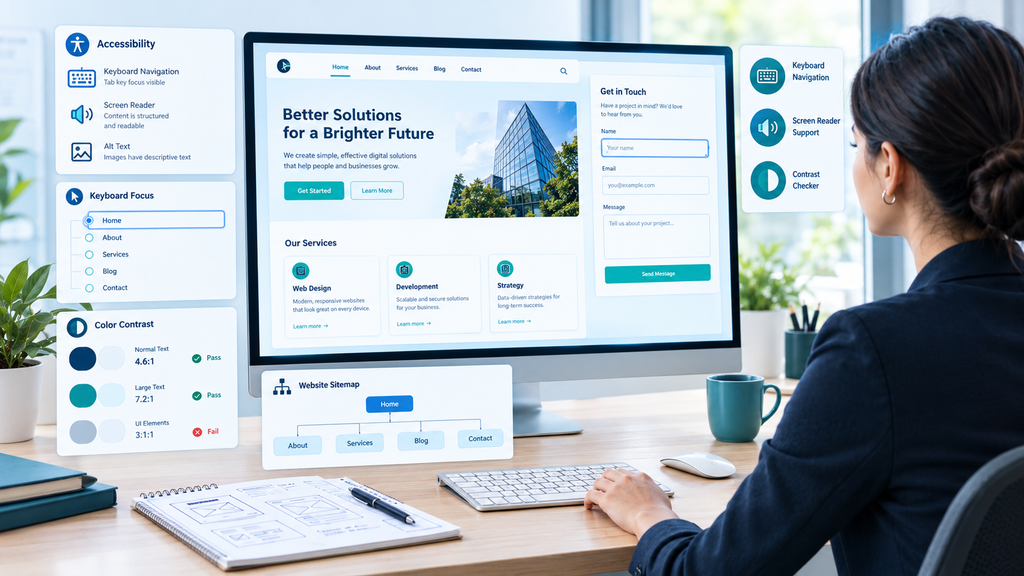
An effective UX audit considers whether different users can understand and operate the website. Accessibility issues can prevent people from finding information, completing forms, or interacting with essential controls.
Review Accessibility
Use the Web Content Accessibility Guidelines (WCAG) 2.2 as a reference for evaluating accessible web content.
Check whether:
- Images that convey information have appropriate alternative text.
- Form fields have clear labels.
- Keyboard users can navigate interactive elements.
- Focus indicators are visible.
- Text and background colors provide sufficient contrast.
- Headings follow a logical structure.
- Error messages identify problems clearly.
- Links and buttons have understandable names.
- Content remains usable when enlarged.
Automated tools can identify some accessibility issues, but they cannot detect every problem. Combine automated checks with keyboard testing and, where appropriate, assistive technology testing.
Review Content and Navigation
A user needs to know what is offered on the page and how to proceed further without any extra hassle.
Go through your website’s main menu, headings, internal links, descriptions of services, call to actions, and contact info. Replace vague titles with relevant ones and eliminate unnecessary and irrelevant information which is a distraction for the user. For example, a reader interested in measuring search performance can continue to our guide on AI search visibility metrics and KPIs.
For service-based companies, keep all the important information such as details about treatments, prices, if any, location, and booking process visible and clear.
UX and accessibility go hand in hand. They both affect the user’s understanding and ability to perform the task.
7. Prioritize Fixes and Measure the Results
A UX audit is only useful when its findings lead to improvements. Once you have identified potential issues, organize them into a practical action plan.
Create an Issue Register
Every discovery should be documented in a spread sheet or project management software. The affected page, evidence, impact to the user, priority of fix, and individual responsible should all be included.
Here is an easy way to prioritize problems:
| Priority | Example | Recommended response |
|---|---|---|
| High | Booking or checkout cannot be completed | Investigate and fix promptly |
| Medium | Important information is difficult to find | Plan a focused improvement |
| Low | Minor spacing inconsistency | Address alongside related design work |
Consider four factors when ranking issues: severity, frequency, impact on the users goal and effort required to resolve the problem.
A simple scoring model can help teams compare issues:
Priority score = Impact × Frequency × Confidence
Rate each factor from 1 to 5. This is a planning aid, than a universal UX standard. Use implementation effort as a consideration when deciding which improvement to tackle first.
Test Changes After Implementation
Don’t assume that the problem is fixed through the redesign process. Review the original evidence and then evaluate the relevant performance metric following implementation of the change.
For instance, if you make changes to the booking form to improve its usability, compare metrics related to form submissions, errors, and user experience feedback before and after making the changes. In cases where it’s feasible, conduct an A/B test to see the impact of the change against other variables.
Document the original problem, change implemented, results and any further issues. This will allow you to create a process that is continuously improving, as opposed to a one-off audit.
UX Audit Checklist: What to Review Before You Finish
Use the following checklist to review your findings prior to writing the final report.
- Goals and metrics of the audit are identified.
- Critical pages and user flows have been reviewed.
- Analysis and user feedback have been analyzed.
- Navigation and information architecture are clear.
- Calls to actions are prominent and meaningful.
- Forms are clear and provide useful error messages.
- Responsiveness and touch usability have been tested.
- Performance problems have been assessed.
- Accessibility tests have been conducted.
- Findings include facts and actionable recommendations.
- Issues are prioritized by impact and severity.
- A measurement strategy for the post-audit phase is in place.
This list serves as a guide, but not as an exhaustive one. The presence of a check mark on the list cannot be considered an indicator of a page’s usability; testing and observations are what should support any conclusion.
Best UX Audit Tools to Consider
You do not need every available tool to conduct a useful UX audit. Choose tools based on the questions you need to answer.
| Tool | Main purpose | Best use |
|---|---|---|
| Google Analytics | Website analytics | Understanding traffic and conversion patterns |
| Microsoft Clarity | Heatmaps and session recordings | Investigating interaction behavior |
| PageSpeed Insights | Performance diagnostics | Identifying loading and Core Web Vitals opportunities |
| Lighthouse | Automated website audits | Reviewing performance, accessibility, and other quality signals |
| axe DevTools | Accessibility testing | Detecting supported accessibility issues |
| Figma | Design and collaboration | Mapping journeys and documenting proposed interface changes |
Features, pricing and usage limits can be different for each tool and plan. Always check the info before picking a paid option.
For a website, simple analytics, browser testing, a spreadsheet and a few talks, with users might be all you need to find the most important changes.
How Often Should You Conduct a UX Audit?
Each website cannot have a single schedule. Perform a website audit when you detect any usability problems, a reduction in vital conversions, recurring user complaints, or any changes within the website.
Website audits can also be performed before any redesign, introduction of a booking or checkout process, targeting a new set of users, or use of a new device.
In the case of websites where there are frequent changes, constant monitoring and usability audits may help in finding any problems before conducting an actual audit.
Frequently Asked Questions
What is included in a UX audit?
A UX audit typically includes goal setting, analytics review, heuristic evaluation, user journey analysis, mobile usability testing, accessibility checks, and prioritized recommendations. The exact scope depends on the website, its audience, and the problems being investigated.
How long does a UX audit take?
The timeline depends on website complexity, the number of pages and user journeys, the availability of analytics, and whether user testing is required. A focused review of a small website may take a few days, while a larger product audit can require several weeks or more.
What is the difference between a UX audit and usability testing?
A UX audit evaluates the overall experience using evidence, design principles, analytics, and other review methods. Usability testing observes representative users attempting tasks to identify where they struggle. Usability testing can be one component of a broader UX audit.
Can I conduct a UX audit myself?
Yes. Website owners, designers, marketers, and developers can conduct a basic audit using analytics, a structured checklist, accessibility tools, and task-based reviews. Independent reviewers and real users can provide additional perspectives and help uncover issues that internal teams overlook.
Does a UX audit improve SEO?
A UX audit can uncover issues involving mobile usability, page performance, navigation, accessibility, and content clarity. Addressing relevant problems may support a better visitor experience, but a UX audit does not guarantee improved search rankings. SEO performance also depends on other factors, including relevance, content quality, and search engine requirements.
Conclusion
The UX audit enables you to create an organized process of analyzing your users’ experience on your website and finding out where there is no need for any extra difficulty. Using goal-setting, gathering of data, evaluation of usability, user journey mapping, testing of the mobile version, checking of the accessibility, and prioritizing the improvements, you will have the opportunity to take more informed decisions concerning your website.
It is better to begin with tasks that are most important both for your users and your company. You should record the problems that you found and implement the changes according to your research and its results.