
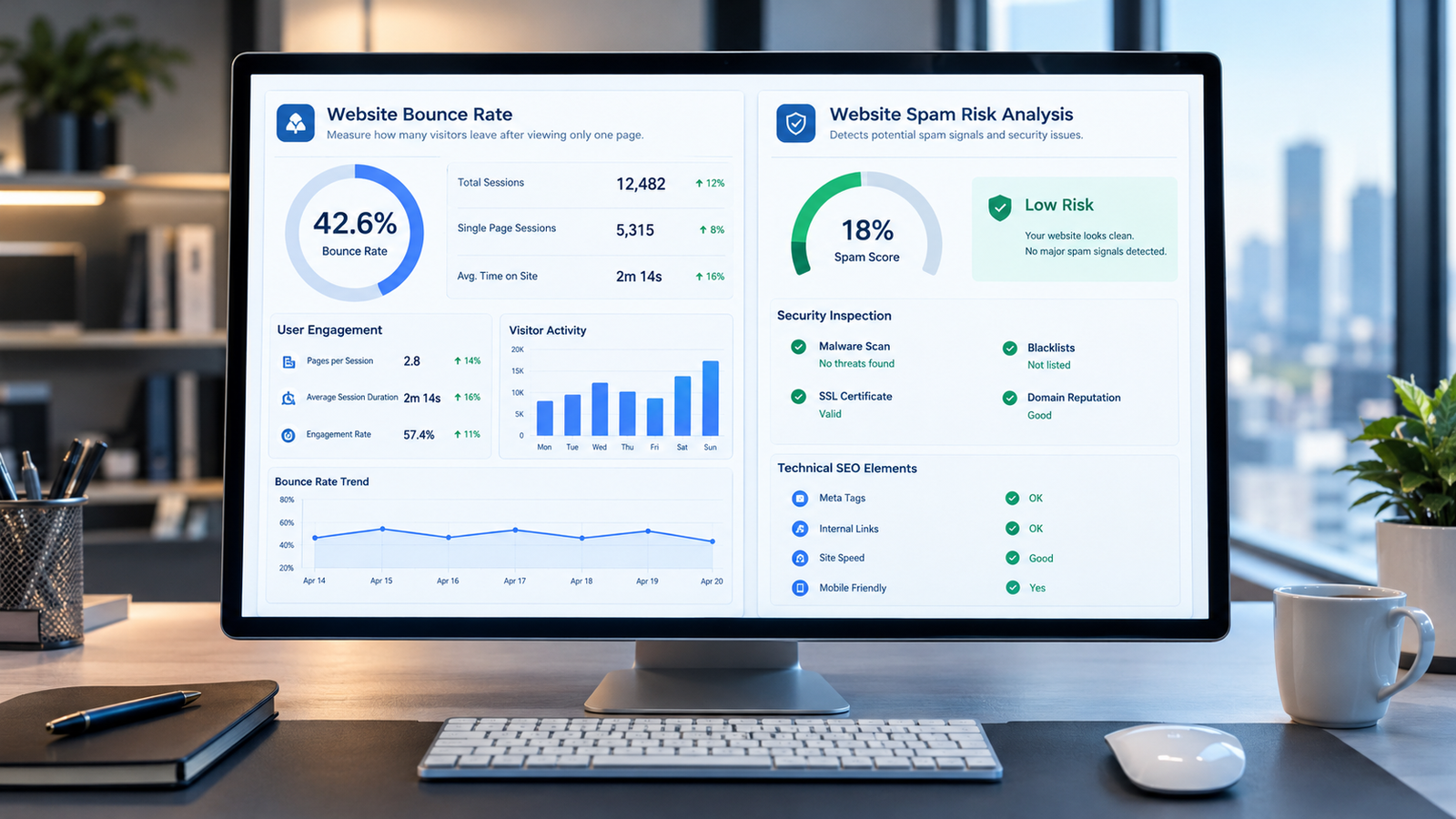
If you manage a website, you have probably noticed that some visitors leave shortly after opening a page. This often raises an important question: What is bounce rate, and can a high bounce rate increase your website’s spam score?
Many website owners worry that visitors leaving quickly could damage their SEO performance or make their websites appear suspicious to Google.
The reality is different. Bounce rate helps you understand visitor engagement, while spam score evaluates different website characteristics. These metrics serve separate purposes, and there is no established direct connection between them.
In this guide, we will explain how bounce rate works in 2026, what it means for SEO, whether it affects website spam score, and how to improve your website’s performance without following misleading SEO advice.
What Is Bounce Rate in SEO?
The bounce rate refers to the number of sessions on your website that are not considered engaged sessions.
An engaged session in Google Analytics 4 (GA4) is when the session:
- Has a duration of more than 10 seconds.
- Triggers one of the key events.
- Views two or more pages or screens
When the above criteria are not met by the session, the GA4 will consider it a bounce.
For example, assume you have 100 people who initiate sessions on your website. When 65 sessions are categorized as engaged while the other 35 sessions are not, your bounce rate will be 35%.
The above data is essential for helping website owners know how the users engage with their website.
But a bounce does not always indicate that the user was not satisfied with your website.
There can be situations where the user lands on your website, finds out what he or she wants to know and then leaves your website without doing anything else. Whether this visit is going to be classified as a bounce or not depends on a number of factors.
Google explains these measurement rules in its official GA4 engagement rate and bounce rate documentation.
How Is Bounce Rate Calculated in 2026?
The formula for the calculation of Google Analytics 4 bounce rate is based on the percentage of non-engaged sessions.
The formula is:
Bounce Rate = (Non-Engaged Sessions ÷ Total Sessions) × 100
Suppose you have a site that has 2,000 sessions within a month.
Now, out of those 2,000 sessions, suppose 1,400 of them meet GA4 engagement criteria.
The calculation would be:
(600 ÷ 2,000) × 100 = 30%
Thus, the bounce rate of this website is 30%.
Alongside measuring bounce rate, GA4 also measures engagement rate. The engagement rate can be considered as the opposite of bounce rate.
Engagement Rate = 100% − Bounce Rate
In case of a site with 30% bounce rate, its engagement rate would be 70%.
It is essential to know that Google Analytics 4 is different in calculating bounce rate from its Universal Analytics counterpart. Previously, bounce was defined as a single page session. This is no longer true in case of GA4.
What Is Website Spam Score?
First of all, we have to clarify what the spam score is before discussing the connection between bounce rate and spam score.
Spam Score is an SEO ranking signal introduced by a third party – Moz.
This tool shows similarities of your website with those that have been penalized or banned by Google according to Moz.
For determining spam scores, Moz uses a machine-learning algorithm based on 27 features of sites that have been penalized/banned by Google.
Features include some domain patterns, site structure, page elements, etc.
Moz categorizes Spam Score into three ranges:
| Spam Score | Moz Classification |
|---|---|
| 1%–30% | Low |
| 31%–60% | Medium |
| 61%–100% | High |
It does not mean that high spam score automatically means that your website is considered by Moz to be spammy or penalized by Google.
For example, a score of 40% means that among similar sites in the database of Moz, there were 40% penalties for such characteristics.
More information about Spam Score metric is available in this official Moz Spam Score guide.
What is important here is that Google does not use Moz Spam Score as its ranking signal.
Does Bounce Rate Affect Website Spam Score?

No. Bounce rate does not directly affect Moz Spam Score, and there is no established formula connecting these two metrics.
Moz’s published Spam Score methodology does not identify Google Analytics bounce rate as one of its 27 features.
This means that a website with an 80% bounce rate will not automatically receive a higher Spam Score.
Similarly, reducing bounce rate from 80% to 30% does not automatically lower Moz Spam Score.
Consider two hypothetical websites.
Website A publishes detailed educational articles. Visitors often find the information they need on a single page, and some leave quickly.
Website B publishes misleading content, uses questionable outbound links, and has several website characteristics associated with spam.
Website A might have a higher bounce rate than Website B, but that alone tells us nothing reliable about which website has a higher Moz Spam Score.
The two metrics measure different things.
Bounce Rate vs Spam Score: Key Differences
| Feature | Bounce Rate | Spam Score |
|---|---|---|
| Primary purpose | Measures non-engaged sessions | Identifies similarities with previously penalized websites |
| Main provider | Google Analytics 4 | Moz |
| Data source | Website interaction events | Moz’s proprietary website analysis |
| Direct Google ranking factor | No established direct use of GA4 bounce rate | No |
| High value means | More sessions failed engagement criteria | More concern under Moz’s model |
| Best use | Analyze visitor engagement | Identify areas worth investigating |
Both metrics can support website analysis, but neither should be treated as a complete measurement of website quality.
Does a High Bounce Rate Affect Google Rankings?
This is another area where SEO advice can become misleading.
Another instance where SEO guidance can become misleading is:
Google has not confirmed that the bounce rate calculated by Google Analytics 4 is considered a ranking factor.
Hence, it will be wrong to say that Google automatically penalizes a website in terms of rankings if its GA4 bounce rate goes up.
Google has more than one ranking system that considers various ranking factors such as relevance and usefulness, among others.
These ranking systems can be explored in the Google’s official ranking systems guide.
However, bounce rate can still provide useful information when investigating website performance.
For example, visitors might leave because:
- The page does not answer their questions.
- The introduction does not match their expectations.
- The website loads slowly.
- Intrusive advertisements interrupt their experience.
- The page displays poorly on mobile devices.
- The content is difficult to read.
These problems can make a website less useful, even though bounce rate itself is not an established direct ranking factor.
Website owners should investigate the underlying problems instead of focusing only on reducing a percentage.
For more information about improving website performance, read our guide to SEO automation and website optimization.
What Is a Good Bounce Rate for a Website?
There is no universal bounce rate that every website should have.
It depends on various factors such as the purpose of the website, the source of the traffic, the type of content, and expectations of the visitors.
For instance, one person who reads an informational article may get his answer right away and exit the page. On an e-commerce website, where a person compares products, he can browse several pages before deciding on a purchase.
This means two different types of user journey.
An elevated bounce rate on an informative page does not mean any problem, while the elevated bounce rate on a product purchasing page may need to be analyzed.
Therefore, it is important not to use some general statistic but to analyze the performance of your website against its history.
Check the similar pages, sources of traffic, devices and keywords.
In case you notice the significant increase in the bounce rate for one particular page, analyze the reasons for such an increase.
They can include technical issues, irrelevant traffic, obsolete article, or even analytics problem.
Why Do Websites Experience High Bounce Rates?
Several factors can contribute to a high bounce rate.
1. Content Does Not Match Search Intent
The search intent is the result people hope to get when they use a certain keyword in their search query.
Let’s consider someone using the query “what is bounce rate” and opening an article where he sees only a recommendation for SEO services instead of the explanation of this metric.
It will be more effective to give an answer right at the beginning of the article.
2. Slow Website Performance
People can exit if the pages are taking too much time to get usable.
Big images, lots of scripts, and poorly configured websites can cause poor performance.
Google suggests measuring page experience, such as the Core Web Vitals, but better results here do not necessarily mean good rankings.
3. Poor Mobile Experience
A website might look excellent on a desktop computer but become difficult to navigate on a smartphone.
Small text, overlapping elements, and difficult navigation can discourage visitors from continuing.
Testing important pages on mobile devices can help identify these issues.
4. Confusing Website Navigation
Visitors should be able to find related information without searching through complicated menus.
Clear navigation, descriptive headings, and relevant internal links make it easier for readers to explore additional content.
5. Misleading Titles and Descriptions
A title should accurately describe what the page contains.
If a search result promises a detailed tutorial but the page offers only a brief promotional message, visitors may leave.
Accurate titles and helpful content create more realistic expectations.
How to Reduce Bounce Rate Without Misleading Visitors
Improving bounce rate starts with understanding what visitors need.
Improve Your Content Quality
Answer the key question in the beginning part of the article.
Include useful information which is helpful for the readers.
Do not add irrelevant paragraphs just to keep the visitors on the web page.
Google recommends creating helpful, reliable, people-first content.
Add Relevant Internal Links
Internal links will allow users to find relevant articles when they require more information.
In this case, site owners who care about increasing engagement would also be interested in learning about the role of reporting tools in monitoring their SEO performance.
The article automated SEO reports gives information on how site owners can manage their SEO monitoring and reporting processes.
Do not use internal links when they do not make sense.
Improve Website Speed and Readability
Compress oversized images, reduce unnecessary scripts, and choose a layout that works well across devices.
Use short paragraphs, meaningful headings, and readable fonts.
These improvements can make your content easier to consume, although they will not guarantee a particular bounce rate.
Analyze Traffic Sources
Traffic from diverse sources will come with diverse expectations.
For instance, traffic generated via advertisements on a completely irrelevant platform may have a tendency to leave the site quicker than traffic from a very relevant search phrase.
GA4 can be used for analyzing diverse traffic sources.
Check Analytics Configuration
Incorrect event tracking can distort engagement measurements.
Review your GA4 implementation and confirm that important events are configured appropriately.
Do not mark ordinary events as key events simply to create an artificially low bounce rate.
Accurate reporting matters more than impressive-looking numbers.
How to Check Bounce Rate in Google Analytics 4
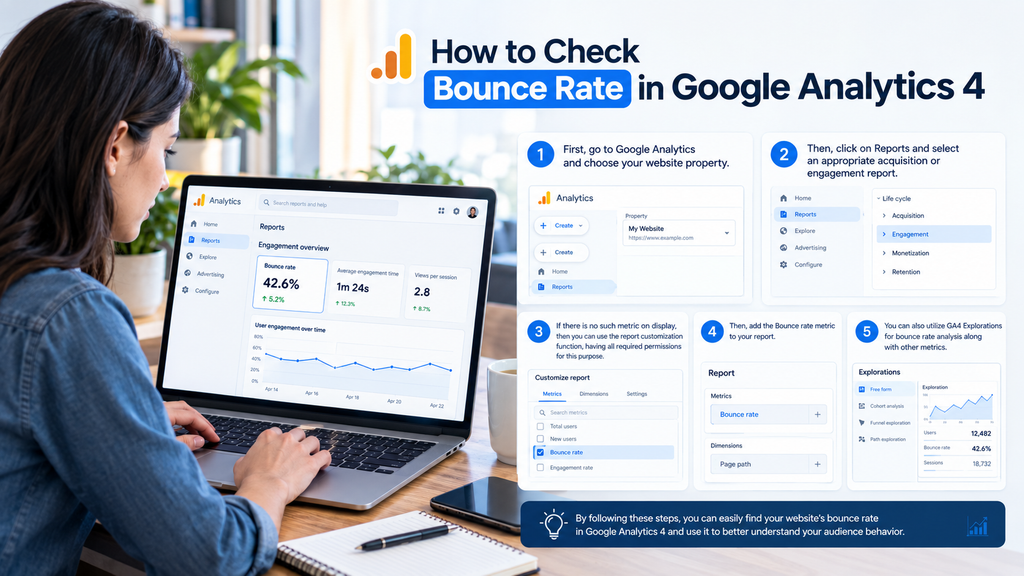
You can track the bounce rate in your GA4 property.
- First, go to Google Analytics and choose your website property.
- Then, click on Reports and select an appropriate acquisition or engagement report.
- If there is no such metric on display, then you can use the report customization function, having all required permissions for this purpose.
- Then, add the Bounce rate metric to your report.
- You can also utilize GA4 Explorations for bounce rate analysis along with other metrics.
Please note that Search Console and GA4 monitor different aspects of the performance of your website.
The first tool will show you how visible your website is in Google and its search statistics like clicks, impressions, and other metrics.
GA4, on the other hand, will show the user interaction with your website after reaching it.
How to Improve Website Spam Score the Right Way
If your website has a Moz Spam Score reducing bounce rate by itself is not the direct solution.
Instead look at the website features that Moz considers and check for quality issues.
Start by looking at your websites content, navigation links going out security and how the site is set up technically.
Ensure that visitors can understand what the website is about and can find contact details.
If you want to look into why the Moz Spam Score is high our complete guide on how to reduce website spam score gives real steps for checking backlinks, content quality, website security and other possible SEO issues.
Review questionable outbound links and avoid participating in link schemes designed to manipulate search rankings.
However, do not assume that every backlink from a high-Spam-Score domain is harmful. Moz’s Spam Score for a website is based on characteristics of that website, not simply the Spam Scores of domains linking to it.
Similarly, a high Spam Score alone is not a reason to disavow backlinks.Check the links that go outside your website and stay away from link plans that try to change how search engines rank sites.
Don’t think that every link from a website is bad. Moz Spam Score for a website depends on the features of that website not on the Spam Scores of the websites that link to it.
Also a high Moz Spam Score by itself is not a reason to say no to backlinks.
Follow Google’s official spam policies when looking at SEO methods.
The best way is to fix website issues instead of making changes just to affect a third party number.
Common Myths About Bounce Rate and Spam Score
Misconceptions persist in the field of SEO.
Myth: High bounce rate always means high website Spam Score.
Fact: Moz does not include GA4 bounce rate in its Spam Score algorithm.
Myth: Google always punishes websites for high bounce rates.
Fact: There is no proof from Google that GA4 bounce rate is used as a ranking factor.
Myth: Low Spam Score always equals better Google rankings.
Fact: Moz Spam Score is an independent metric and not associated with Google rankings.
Myth: Bounce rate has to be under 40% for every website.
Fact: There is no such universal threshold for every website and for different types of pages.
Myth: Low bounce rate means better SEO rankings.
Fact: Optimizing user experience may help, but decreasing the analytics percentage will not affect rankings.
Frequently Asked Questions
What Is Bounce Rate in Simple Words?
Bounce rate is the percentage of website sessions that do not qualify as engaged sessions. In GA4, engagement depends on session duration, key events, or multiple page or screen views.
Does Bounce Rate Increase Spam Score?
No. There is no established direct relationship between Google Analytics bounce rate and Moz Spam Score.
Is an 80% Bounce Rate Bad for SEO?
Not necessarily. An 80% bounce rate means 80% of sessions did not meet GA4’s engagement criteria. Whether that indicates a problem depends on the page’s purpose, audience, and tracking configuration.
Does Google Use Moz Spam Score?
No. Moz Spam Score is a third-party SEO metric. Google uses its own systems to evaluate search quality and spam.
Can a Website Have a High Bounce Rate and Low Spam Score?
Yes. A website can have a high bounce rate and a low Moz Spam Score because the metrics measure different characteristics.
How Can I Reduce Bounce Rate Naturally?
Improve content relevance, page usability, mobile performance, navigation, and internal linking. Also verify that your analytics configuration measures engagement accurately.
Conclusion
Knowledge of what is bounce rate and how it correlates with website spam score enables website owners to avoid some SEO myths.
The bounce rate determines the level of visitors’ engagement through Google Analytics 4, and Moz Spam Score determines similarities between a website and those which have been flagged or penalized before.
High bounce rate doesn’t necessarily lead to higher Moz Spam Score, and decreasing bounce rate doesn’t mean improving rankings on Google.
Rather than aiming at perfection, one should focus on valuable content, quality of analytics, good website performance, and proper SEO techniques.
This will provide visitors with a better experience as well as help with building a website.